
A full-size bionic humanoid, fully documented.
31 degrees of freedom, high-torque electric actuators, and up to 2070 TOPS of onboard AI compute — built for humanoid locomotion research, embodied AI, and human–robot interaction.
From power-on to first command
Unitree's official power-on and shutdown procedure for the H2 — enough for a supervised operator to go from a cold robot to a stable stand under remote control.
Pre-start checks
Suspend or securely support the H2 on a suitable support frame, front facing forward. Clear the surrounding area of people and obstacles, and arrange the arms and legs in a natural, untangled posture. The H2 cannot actively balance until it enters motion-control mode — keep it supported and keep personnel clear.
Install the battery
Insert the quick-release smart battery into its compartment until the latch engages with a clear click. Confirm the pack is fully seated. Do not force it — if it doesn't seat smoothly, remove it and check the orientation.
Power on
Briefly press the battery power button once, then press and hold for more than 2 seconds to turn it on. Wait roughly one minute for initialization — the robot enters its zero-torque / damping state automatically. Keep the environment unobstructed during this process.
Stand and operate
Using the remote controller, bring the H2 into standing-preparation while firmly supporting it. Lower it until both feet make stable contact, then switch into motion-control mode. Verify stable balancing before releasing support or issuing movement commands.
Emergency stop
If the H2 enters an abnormal or unsafe state, trigger the emergency stop via the physical E-stop or the controller stop combination. The robot switches to a damping/protective mode and lowers itself toward the ground in a controlled manner. Always know the E-stop location before operating, and keep it within reach.
Shutdown procedure
Move the H2 to an open, level, supported area. Command it into standing-preparation / resting posture, engage zero-torque / damping mode, then briefly press the battery button and hold >2 s to power down. Remove the battery pack for storage if the robot will be unused for an extended period. Keep hands and clothing clear of the joints during every posture transition.
Exact controller key combinations depend on the firmware build shipped with your unit — refer to the controller reference supplied with the robot. Full procedure: Official Unitree H2 Developer Guide · MYBOTSHOP H2 User Manual (PDF).
What's inside the H2
A modular, highly articulated humanoid body paired with fully open, low-latency control interfaces — suitable for locomotion research, embodied AI, HRI experiments, and manipulation with optional dexterous hands.
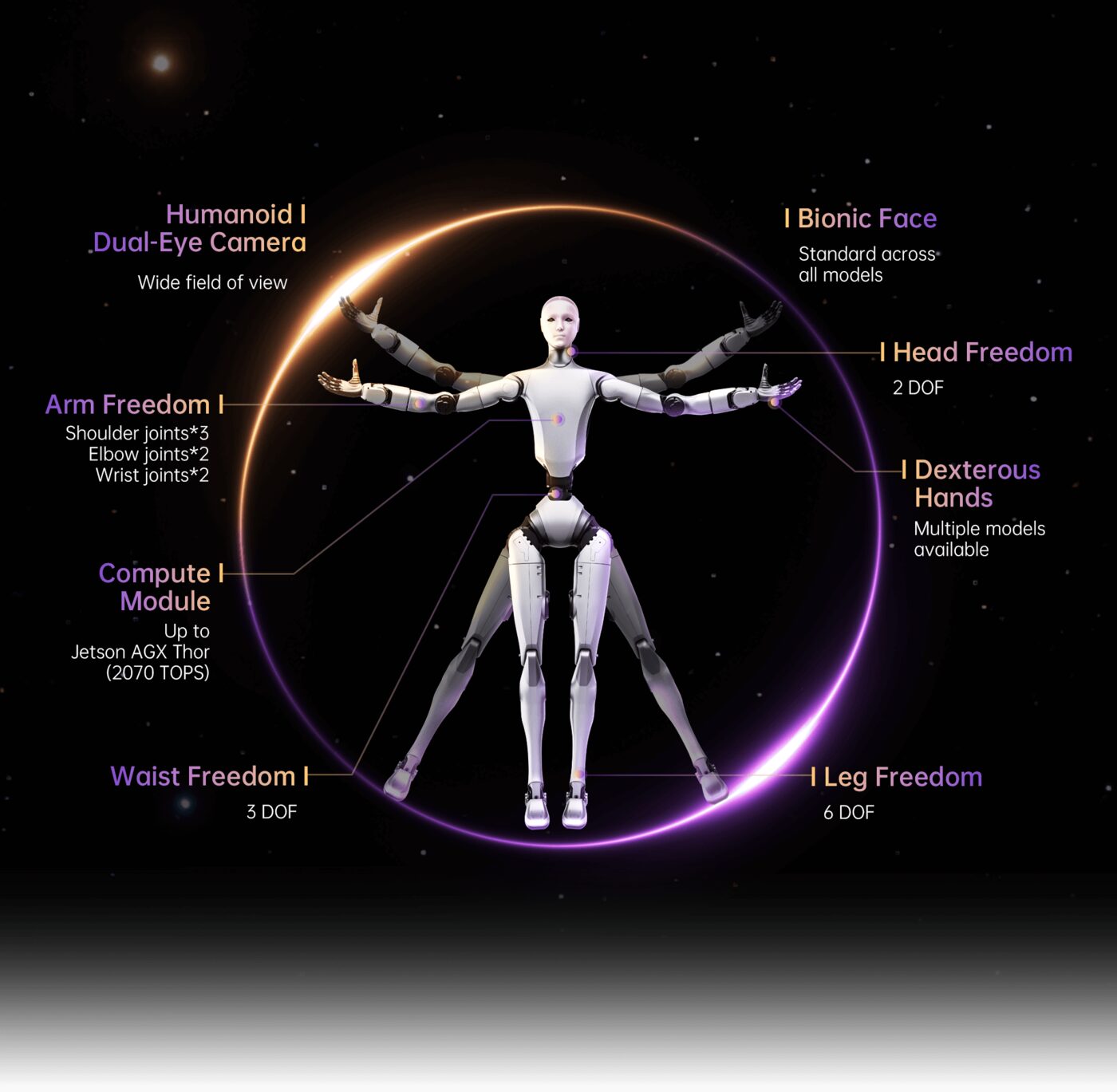
Official Unitree H2 parameter diagram
Whole-Body Motion
6-DOF legs, 7-DOF arms, a 3-DOF waist and a 2-DOF head — 31 DOF total. Unitree's self-developed electric (PMSM) actuators deliver peak torque up to 360 N·m with dual encoders for position and velocity feedback.
Perception
A humanoid binocular camera with a wide field of view for visual and depth perception, an onboard IMU combined with per-joint dual encoders for proprioception, plus optional tactile sensing via dexterous hands.
Onboard AI Compute
A high-performance AI compute platform rated at up to 2070 TOPS, giving headroom for onboard perception, planning, and multimodal model inference.
Power System
A quick-release smart battery for fast swaps during extended operation, with roughly 3 hours of runtime depending on workload and configuration.
Open Control Interfaces
Fully open, low-latency control over Unitree's CycloneDDS-based stack: unitree_sdk2 (C++), unitree_sdk2_python, and unitree_ros2 — usable with or without ROS 2. Both high-level (task-space) and low-level (per-joint) control are exposed.
Network & Development
The H2 connects to a development PC over Gigabit Ethernet on the conventional Unitree 192.168.123.x subnet. Ubuntu 20.04, GCC 9.4 (C++17) and CMake 3.10+ are the documented build requirements for the C++ SDK.
Low-level joint control bypasses built-in balancing safeguards — always validate commanded joint motions against the documented limits and keep the emergency stop within reach. Full SDK setup, build commands and joint reference: Official Unitree H2 Developer Guide.
Whole-arm teleoperation
An operator wearing an upper-body teleoperation rig drives the H2's arms and hands directly — the robot mirrors the operator's motion to pick an object off a table and place it into a box.
H2 under live teleoperation: the operator's arm and hand movements, captured by a wearable exoskeleton-style controller, are reproduced by the robot to move a bin from the table into a cardboard box. The robot's control interface is visible on the screen behind — more on the Webserver page.
Manuals, developer docs & robot description
Everything published for the H2 so far — the manufacturer's own developer guide, the MYBOTSHOP manual, the open-source SDK repositories, and the robot's URDF model.
Complete Source Repo
The complete ROS 2 source workspace for QRE H2 — every ROS 2 package, launch file and driver node, built and maintained by MYBOTSHOP. Confidential — shared under NDA with named customers; sign in or request access below.
Official Unitree H2 Developer Guide
The manufacturer's own H2 documentation — the authoritative reference for joint indices, motion limits, network addresses and firmware-specific detail not published elsewhere.
Open docs →MYBOTSHOP H2 User Manual
A single self-contained manual covering the H2: startup & shutdown procedure, full hardware specification, and SDK development & network setup for unitree_sdk2, its Python bindings, and unitree_ros2.
H2 Robot Description (URDF)
The h2_description package for the full 31-DOF body — URDF, visual (COLLADA) and collision (STL) meshes and package.xml — the same model rendered live in the viewer above. Drop it straight into a ROS 2 workspace, RViz, or MoveIt. Note: this package's package.xml declares a Proprietary license; check with support@quadruped.de before redistributing it further.
Foxtec Exo Std Teleop Toolkit
Operator-PC tooling to teleoperate the H2 with the Foxtec “Exo Std” 7-DoF leader arm in joint mode — both arms, both Inspire RH56 hands (trigger grip, A/B thumb opposition), and walking via the right thumbstick. Not deployed to the robot: it runs on your own laptop and talks to H2's arm-IK WebSocket and walk HTTP API. Includes calibration, self-test and a full setup guide for a new operator PC.
Download toolkit (.zip)Unitree SDK Repositories
The open-source SDKs behind everything in the Hardware & Software section above: unitree_sdk2 for C++, unitree_sdk2_python for Python, and unitree_ros2 for the ROS 2 bridge.
If something goes wrong
Two steps, in order — the forum first for fast community and staff triage, then a direct ticket if it needs to go further.
MYBOTSHOP Forum
Open a topic on the MYBOTSHOP Forum for community and staff triage — most software questions and known issues get resolved here first. For code-level bugs, GitHub Issues, StackOverflow and Answers-ROS are also in play.
Direct ticket & RMA
If it's unresolved, email support@quadruped.de with the problem description and what's already been tried. For hardware issues we'll issue an RMA number and return instructions — returns without an RMA number are auto-rejected.
RMA returns ship to: QUADRUPED Robotics GmbH c/o MYBOTSHOP GmbH, Willy-Messerschmitt-Strasse 12, 50126 Bergheim, Germany.
We're here for the whole deployment
A new use case, a question about SDK integration, or hardware not covered above — the MYBOTSHOP team can help.
support@quadruped.de