
Full-size bipedal humanoid, fully documented.
A research-grade, human-sized biped — the base H1 (19 driven body joints) and the upgraded H1-2 (27 joints, 3-DOF wrists) both run the same ROS 2 driver stack (QRE H1), layered on stock Unitree hardware by MYBOTSHOP / QUADRUPED Robotics.
From power-on to Develop Mode
H1's own boot procedure, condensed from the manufacturer's Manuals and Powering-on pages — enough for a supervised operator to go from a cold robot to remote-controlled walking, and then safely into Develop Mode for ROS 2 work.
Power on
Battery compartments sit beneath the left arm. Press the power button on both batteries simultaneously once, then press and hold for 3 seconds to start the robot — the same combo powers it back off. Keep an eye on both battery levels: if either one depletes, the robot falls.
Hang & Power On
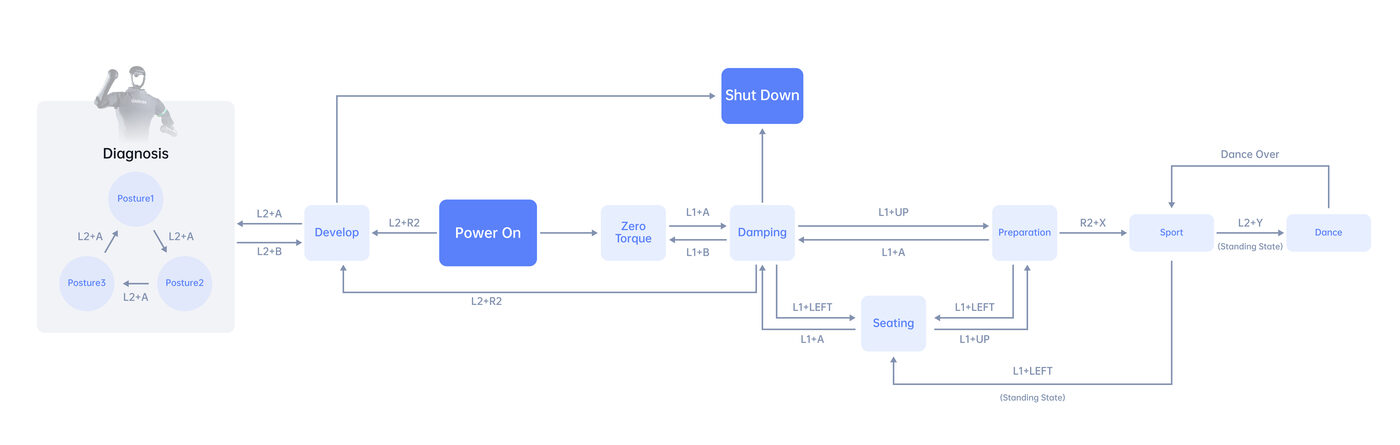
Tie the shoulder latch to a protective frame with a dead-knot rope, insert both batteries (key-forward), turn the arms inward and lower them vertically, and cock the feet up to their limit. Power on; once you hear the ankle click and wait an extra 30 s, press L2+B to unlock damping and L2+UP for Ready Mode. Lower the frame until the feet touch, R2+X for Sport Mode, then START for standing and remove the rope.
Sit & Power On
H1's hip is comparatively wide — use a wide, stable chair. Seat the robot, fit the battery, set the arm/ankle to a natural position and power on. Once the ankle click confirms init, L2+B for damping then L2+UP for stand-up — an operator must brace the robot from behind with the rear bracket the whole time to stop it tipping backward. Once upright and balanced, R2+X for walking mode.
H1-2 does not support the Sit & Power On/Off rig, and has only one diagnostic posture — gantry-only for that variant.
Develop Mode & diagnostics
With H1 suspended and damped, press L2+R2 to enter Develop Mode. L2+A then drives it into a diagnostic posture, confirming entry; L2+B returns it to damping. The built-in motion controller keeps sending zero-speed commands even without the remote — starting the SDK before Develop Mode is confirmed can make H1 jitter, so verify with L2+A first and repeat L2+R2 if it doesn't respond as expected.
Drive with the remote
In Sport Mode, START toggles continuous walking vs. standing in place; left stick drives forward/back, right stick rotates. B/A raise/lower the leg-lift height. Quick gestures: SELECT+A handshake, SELECT+Y wave, L2+LEFT sit down (H1 only), L1+Y dance mode (H1 only).
Power off / E-stop
Normal shutdown: L2+B back to damping, reattach the rope/reposition at the chair, then simultaneously short- and long-press both battery buttons. Emergency stop, any time: L2+B — H1 relaxes into damping and lowers itself to the ground, so keep supports and the workspace clear.
Default IP addresses
| Device | IP Address | User / Password |
|---|---|---|
| H1 MCU | 192.168.123.161 | — |
| H1 Auxiliary PC 2 | 192.168.123.164 | unitree / Unitree0408 |
| H1 Webserver (MBS) | 192.168.123.164:9000 | admin / mybotshop |
| H1 Nvidia Backpack | 192.168.123.165 | administrator / mybotshop |
| Mid-360 LiDAR | 192.168.123.120 | — |
| Ouster LiDAR | 192.168.123.20 | — |
Connect over Ethernet
Full procedure with photos for every step, remote button map and app links: Official Unitree H1 Developer docs · MYBOTSHOP H1 User Manual (PDF).
The QRE H1 ROS 2 stack
MYBOTSHOP / QUADRUPED Robotics layers a ROS 2 driver stack on the H1's high-level SDK, all running under ROS_DOMAIN_ID=10. The repository's default branch and its main install path target ROS 2 Humble; the network guide and a separate "install the Unitree SDK's own DDS topics" path still document ROS 2 Foxy on Ubuntu 20.04 — check which is on your unit before following distro-specific steps.
Autostart & Bringup
ros2 launch h1_bringup system.launch.py starts high-level leg and arm control plus Domain Bridge, Joint States, Robot Description, IMU, Sensor Fusion, Twist Mux, Logitech F710, D435i and Mid-360 drivers. Keep the arms straight down at power-on — a different starting pose affects ROS 2 control init, and the arms will move to face the forearms forward.
Locomotion & Posture
Posture/state commands over the hardware_modes service — damp, start, stand_up, zero_torque, stop_move, high_stand, low_stand, balance_stand. Setter/getter services cover FSM ID, balance mode, swing/stand height and velocity; low-level leg modes (damp, stand_switch, swing-height trim, enable_ctrl) are also exposed directly.
Arm Control
Canned high-level poses — h1_arm_default, h1_arm_zero, h1_arm_t, h1_arm_pick — plus per-arm FollowJointTrajectory actions for custom trajectories and a MoveIt2 integration (h1_moveit, TRRT planner). H1-2 adds a dual-arm server with T-pose/ready-pose examples and a record/playback service for teleoperated demonstrations, saved as CSV.
Perception & Sensors
Head-mounted Livox Mid-360 LiDAR and Intel RealSense D435i are launched by default with bringup; a ZED2i stereo camera is an alternative depth source. Field upgrades documented: Ouster LiDAR and an Emlid M2 GPS/RTK unit, configurable via the webserver's VNC at 192.168.2.15.
Navigation & SLAM
h1_navigation slam.launch.py for mapping (drive it with 0.2 m/s keyboard teleop, export via nav2_map_server), plus separate odometry- and map-based navigation launch files. GPS navigation is documented but not yet supported.
Teleoperation
ROS 2 teleop_twist_keyboard remapped onto the robot's namespaced cmd_vel, driven from any SSH session. A Logitech F710 driver ships as part of bringup. Steamdeck integration maps leg control to the joystick (L1 slow, R1 turn) over the robot's own WiFi — arm control via the joystick is on the roadmap.
Simulation
Gazebo Fortress (h1_gazebo h1_2_fortress_simulation.launch.py), sim-to-real reinforcement learning via Unitree RL Gym, and NVIDIA Isaac Lab (with a dedicated H1 deployment tutorial).
Webserver & Rigs
Unlike other MYBOTSHOP platforms, H1 has no onboard webserver Cockpit yet — the docs mark both Webserver and Rigs as "Coming Soon" / "Not Supported". The ROS 2 CLI, RViz2 and the SDK examples above are the primary interface today.
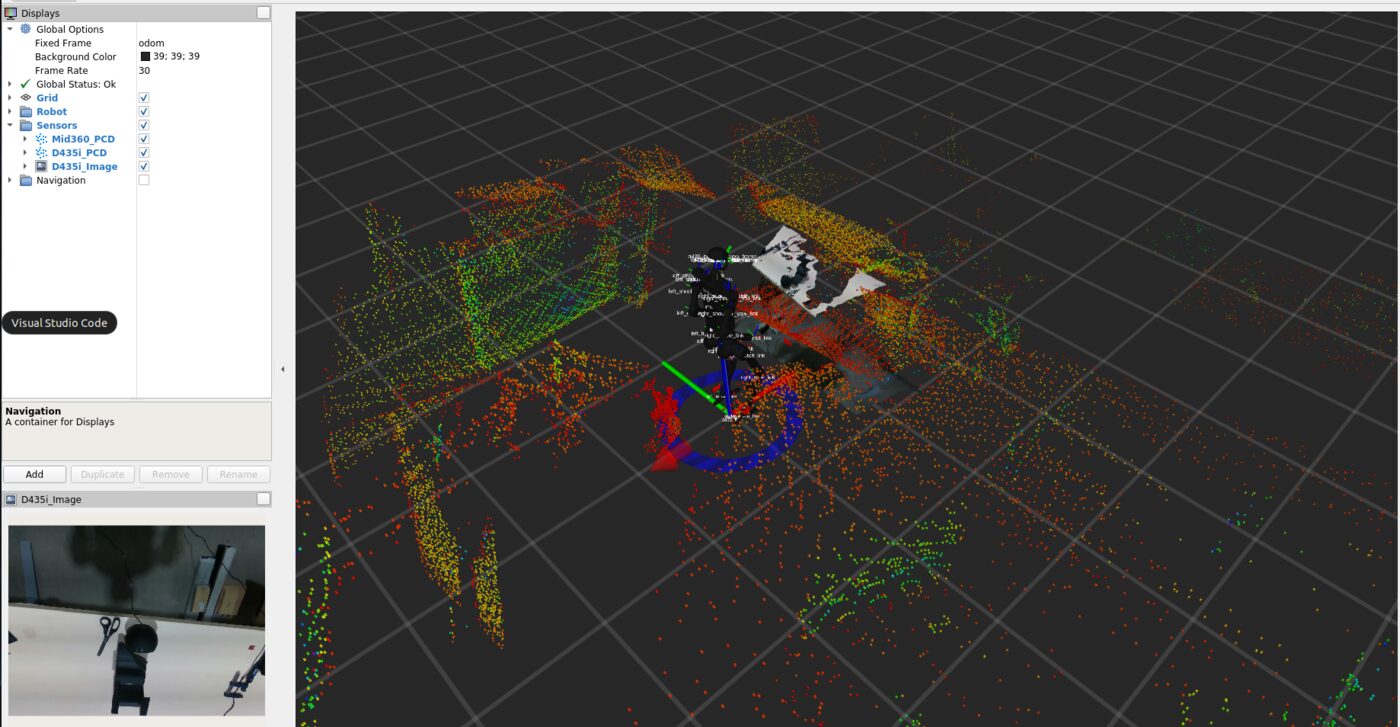
Full package reference (h1_description, h1_control twist-mux & EKF localization), debugging commands (RQt, TF tree, dynamic reconfigure) and the from-scratch install walkthrough: PDF manual.
Two body variants, one software stack
H1-2 is the upgraded iteration — more DOF per arm and leg, 3-DOF wrists — but shares the same on-board computers, sensors and QRE H1 ROS 2 driver as the base H1.
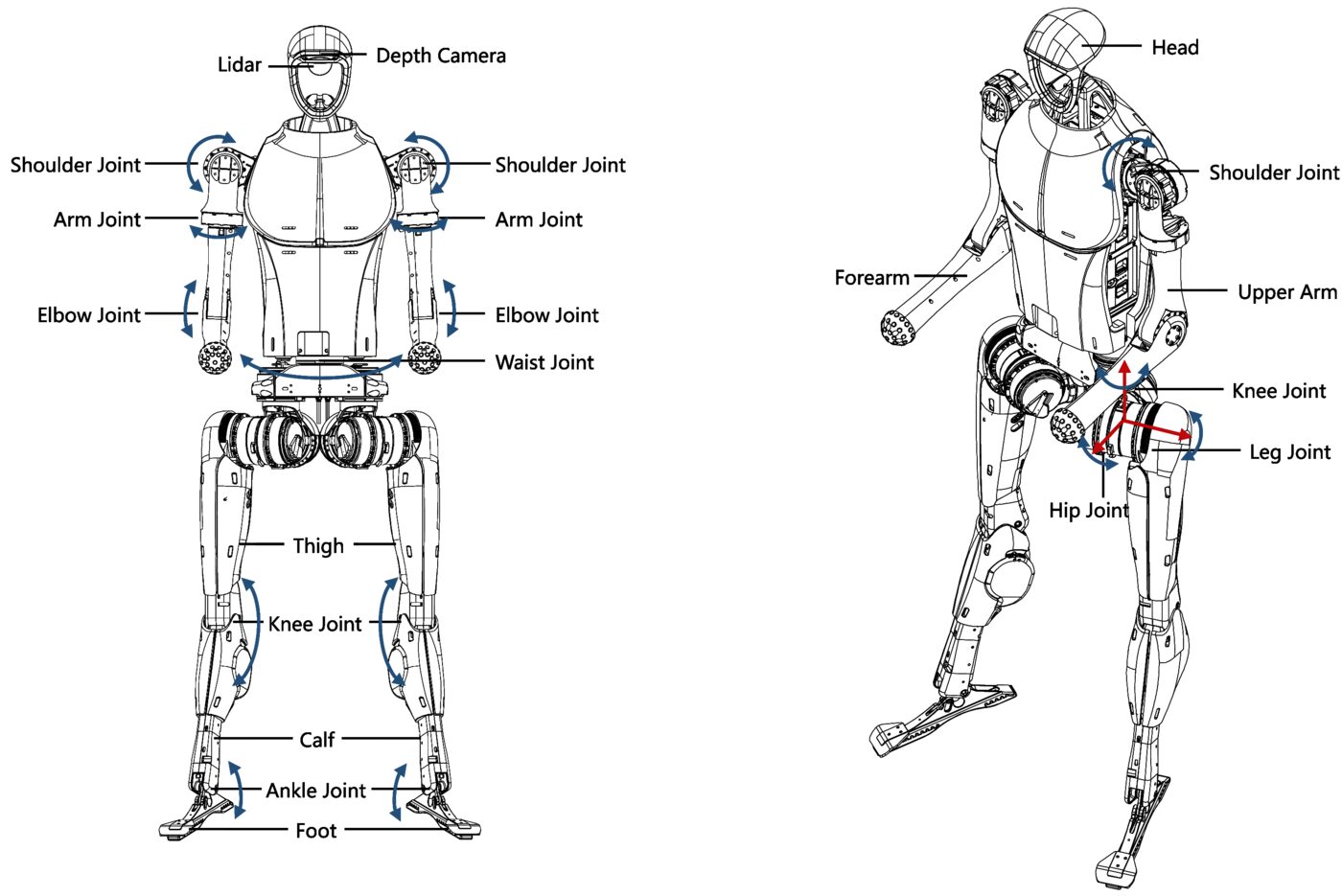
H1 (base)
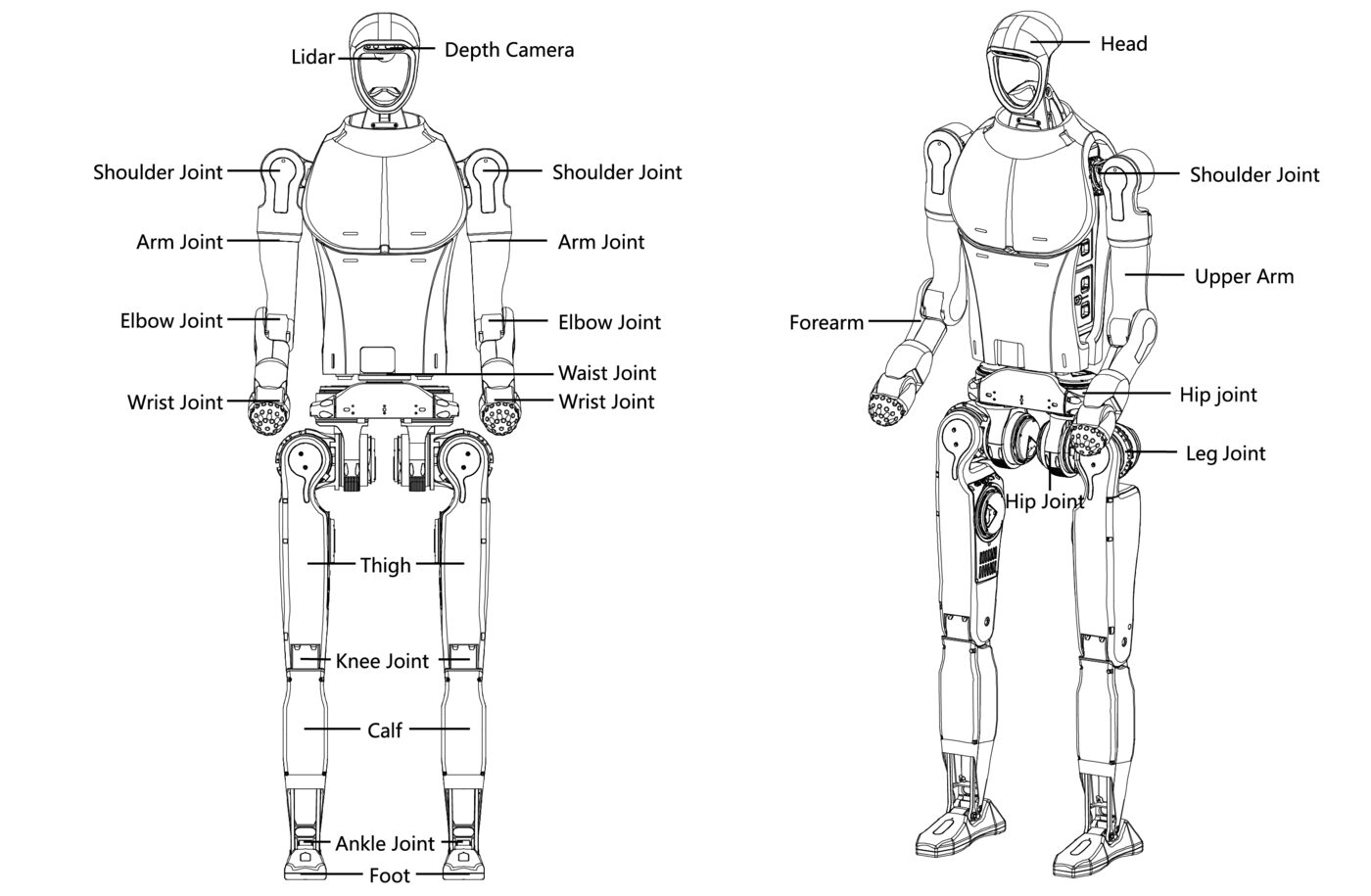
5 joints per leg (hip yaw/roll/pitch, knee, ankle), 1 waist joint, 4 joints per arm (shoulder pitch/roll/yaw, elbow) — 19 joint motors total. Supports both the Hang & Power On and Sit & Power On startup rigs, plus Dance Mode.
H1-2
6 joints per leg (adds a split ankle pitch/roll and a wider hip-roll range), 1 waist joint, 7 joints per arm (adds elbow roll plus a 2-DOF wrist pitch/yaw) — 27 joint motors total. D435 camera; gantry startup only — no sitting, no Dance Mode. Gets its own dual-arm record/playback ROS 2 services.
Left-arm joint limits (radians)
| Joint | H1 | H1-2 |
|---|---|---|
| Shoulder pitch | −2.87 ~ +2.87 | −3.14 ~ +1.57 |
| Shoulder roll | −0.34 ~ +3.11 | −0.38 ~ +3.4 |
| Shoulder yaw | −1.3 ~ +4.45 | −3.01 ~ +2.66 |
| Elbow | −1.25 ~ +2.61 | Pitch −2.53~+1.6, Roll −2.967~+2.967 |
| Wrist | — (not present) | Pitch −0.471~+0.349, Yaw −1.012~+1.012 |
Shared across both
Full joint numbering tables for both variants (legs, torso, arms) and the reference-frame/zero-position diagrams: PDF manual.
Manuals, apps & robot description
Everything needed to operate the H1 safely, develop against the QRE H1 stack, or bring its model into your own tooling.
Complete Source Repo
The complete ROS 2 source workspace for QRE H1 — every ROS 2 package, launch file and driver node, built and maintained by MYBOTSHOP. Confidential — shared under NDA with named customers; sign in or request access below.
Official Unitree H1 Developer Docs
The manufacturer's own H1 documentation, plus the H1 iOS (TestFlight) and Android app downloads, and the official Isaac Lab H1 deployment tutorial.
Open docs → H1 iOS app →MYBOTSHOP H1 User Manual
A single self-contained manual: network/SSH quick start, the full power-on & shutdown procedure for both startup rigs, hardware specification and joint tables for H1 and H1-2, and the complete QRE H1 ROS 2 package reference.
Download PDFH1 Robot Description (URDF)
The h1_description package for the base 19-DOF body — URDF, visual meshes and package.xml — the same model rendered live in the viewer above. Drop it straight into a ROS 2 workspace, RViz, or MoveIt. Note: this package's package.xml declares a Proprietary license; check with support@quadruped.de before redistributing it further.
Looking for the H1-2 (27-DOF) URDF, the Unitree Dex3 / Inspire dexterous-hand meshes, or the ROS2-specific driver repository? The repo is gated to customers and partner institutions — send your purchase ID and GitHub username to support@mybotshop.de for access, or ask us directly for the extra meshes.
If something goes wrong
Two steps, in order — the forum first for fast community and staff triage, then a direct ticket if it needs to go further.
MYBOTSHOP Forum
Open a topic on the MYBOTSHOP Forum for community and staff triage — most software questions and known issues get resolved here first. For code-level bugs, GitHub Issues, StackOverflow and Answers-ROS are also in play.
Direct ticket & RMA
If it's unresolved, email support@quadruped.de with the problem description and what's already been tried. For hardware issues we'll issue an RMA number and return instructions — returns without an RMA number are auto-rejected.
RMA returns ship to: QUADRUPED Robotics GmbH c/o MYBOTSHOP GmbH, Willy-Messerschmitt-Strasse 12, 50126 Bergheim, Germany.
We're here for the whole deployment
Fleet rollout, a new use case, or a question about a specific ROS 2 package — the MYBOTSHOP team can help.
support@quadruped.de