
A lightweight 6-DOF arm, fully documented.
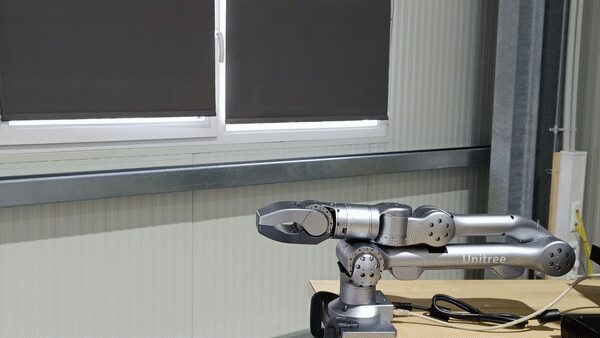
Unitree's compact manipulator arm with an optional parallel gripper, driven by a ROS Noetic + MoveIt stack (z1_base) layered on Unitree's own closed-source z1_controller / z1_sdk by MYBOTSHOP.
From a fresh workstation to driving the Z1
The Z1's ROS driver runs on a remote PC connected to the arm over Ethernet — set up the network link first, then launch MoveIt with or without the gripper.
Wire up & set a static IP
Connect the Ethernet cable supplied with the Z1 between the robot and your PC. In Ubuntu, go to Settings → Network, add a new connection, switch IPv4 to Manual, and set address 192.168.123.51 / netmask 24. Save and reconnect.
Verify the link
Check your host got the assigned address with ifconfig, then confirm the robot answers: ping 192.168.123.110 — that's the Z1‑MCU's fixed address (no password).
Launch MoveIt
Arm + gripper: roslaunch z1_gripper_moveit_config real_z1_moveit.launch. Arm only: roslaunch z1_moveit_config real_z1_moveit.launch. Either launches the bringup driver, control parameters and MoveIt together — controllable via the MoveIt GUI or the z1_demo scripts.
Full network reference table and command sequences: MYBOTSHOP Z1 User Manual (PDF).
ROS Noetic + the QRE Z1 package set
ROS Noetic on Ubuntu 20.04, with a catkin workspace and Unitree's own z1_controller / z1_sdk underneath. Full apt/catkin install commands are in the PDF manual.
z1_base
The ROS wrapper for controlling the Z1 — sits on top of Unitree's closed-source z1_controller / z1_sdk binaries.
z1_bringup
Launches the z1_base driver: roslaunch z1_bringup bringup.launch.
z1_control
Control parameters for the Z1 arm as used by MoveIt.
z1_demo
A demo script that runs a series of trajectories in conjunction with MoveIt — the fastest way to see the arm move without writing code.
z1_description
The 3D models of the Z1, stitched into a single URDF (z1.urdf) — the same model rendered live in the viewer above.
z1_gripper_moveit_config
Bringup + control + MoveIt for the arm with the gripper. GUI or z1_demo controllable: roslaunch z1_gripper_moveit_config real_z1_moveit.launch.
z1_moveit
Bringup + control + MoveIt for the arm only (no gripper): roslaunch z1_moveit_config real_z1_moveit.launch.
Optional for simulation: Gazebo11 (Noetic). Full ROS Noetic apt/catkin install walkthrough is in the PDF manual.
Manuals, manufacturer docs & robot description
Unitree's own Z1 documentation and repositories, the MYBOTSHOP manual, and the robot description package.
Complete Source Repo
The complete ROS 2 source workspace for QRE Z1 — every ROS 2 package, launch file and driver node, built and maintained by MYBOTSHOP. Confidential — shared under NDA with named customers; sign in or request access below.
Official Unitree Z1 Docs & Repositories
The manufacturer's own tutorial site plus the three GitHub repositories underneath the driver stack, and the manufacturer's (Chinese-language) full documentation portal.
Z1 Unitree Tutorial → z1_controller on GitHub → z1_sdk on GitHub → unitree_ros on GitHub →MYBOTSHOP Z1 User Manual
A single self-contained manual: network setup, full ROS Noetic + catkin workspace install walkthrough, MoveIt quick start for both launch variants, and the complete z1_* ROS package reference.
Z1 Robot Description (URDF)
The z1_description package — both URDF variants (z1.urdf arm-only, z1_gripper.urdf with the 7th gripper joint), Collada visual meshes and package.xml — the same model rendered live in the viewer above. Drop it into a ROS workspace, RViz, or MoveIt.
Manufacturer documentation portal is Chinese-language and needs a browser translation plugin: open it here →. Looking for the closed-source z1_controller / z1_sdk source or the vendored Gazebo simulation layer? Ask us directly.
If something goes wrong
Two steps, in order — the forum first for fast community and staff triage, then a direct ticket if it needs to go further.
MYBOTSHOP Forum
Open a topic on the MYBOTSHOP Forum for community and staff triage — most software questions and known issues get resolved here first. For code-level bugs, GitHub Issues, StackOverflow and Answers-ROS are also in play.
Direct ticket & RMA
If it's unresolved, email support@quadruped.de with the problem description and what's already been tried. Our support team will evaluate the case and, if necessary, issue an RMA number with a return address or shipping label — returns without an RMA number are declined and sent back.
RMA returns ship to: QUADRUPED Robotics GmbH c/o MYBOTSHOP GmbH, Willy-Messerschmitt-Strasse 12, 50126 Bergheim, Germany. Do not ship goods to QUADRUPED Robotics GmbH Office in Leverkusen! Interested in getting involved or contributing? Contact support@mybotshop.de directly.
We're here for the whole deployment
Repository access, a gripper integration question, or something else about the Z1 — the MYBOTSHOP team can help.
support@quadruped.de