
A 60 kg industrial quadruped, fully documented.
Twelve high-torque leg joints under a ROS 2 driver stack (QRE B2) — walking, teleop, SLAM/Nav2 navigation and Gazebo Fortress simulation, plus a wheeled B2-W variant and Unitree Z1 arm mobile-manipulation build, layered on stock Unitree B2 hardware by MYBOTSHOP.
What the B2 is
Unitree's large industrial/research quadruped — not the compact Go/A1-class robots, a 60–85 kg platform built for inspection, logistics and research payloads. MYBOTSHOP/QUADRUPED ships it with a ROS 2 driver stack, webserver, navigation and simulation packages on top of the stock Unitree hardware and SDK.
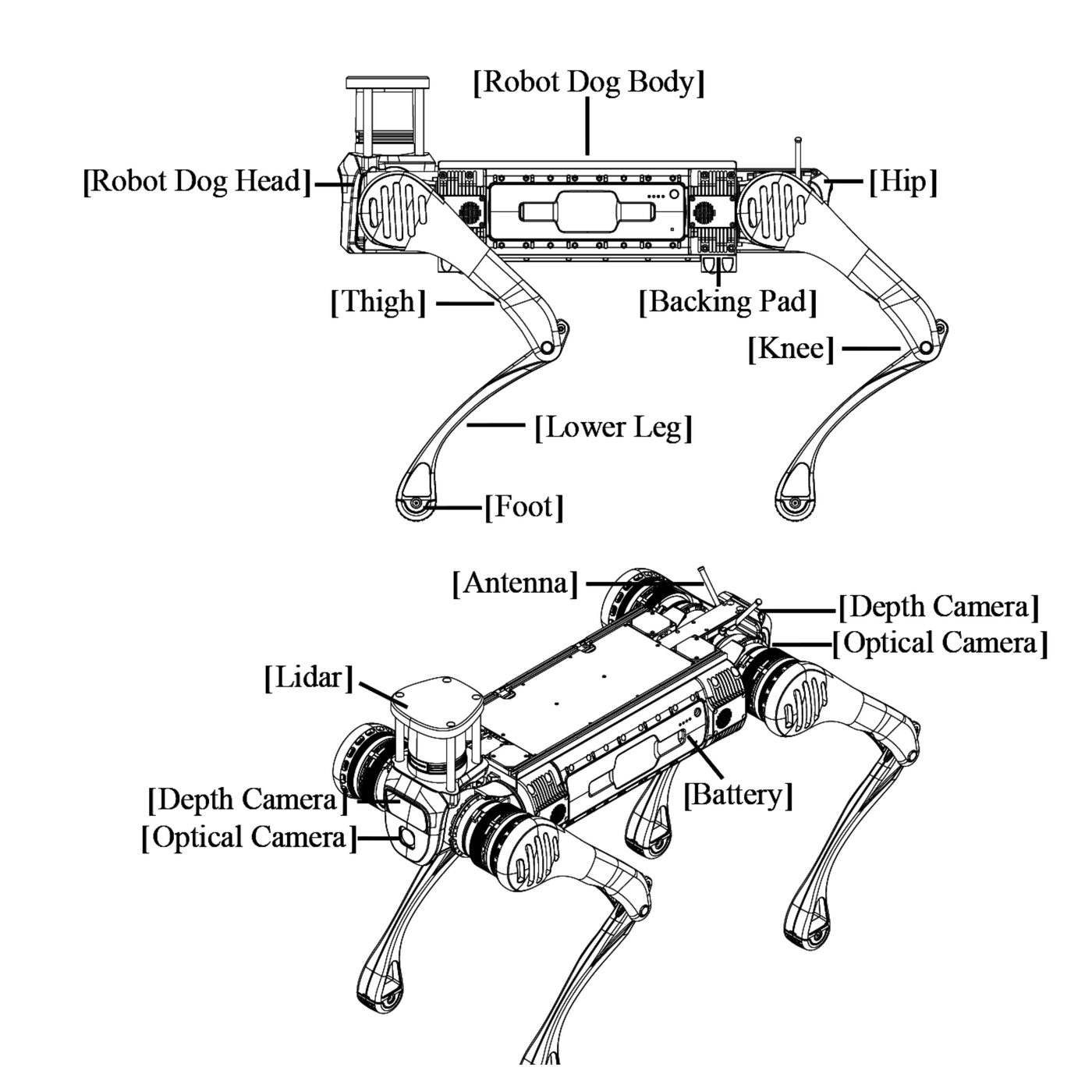
B2 vs. B2-W
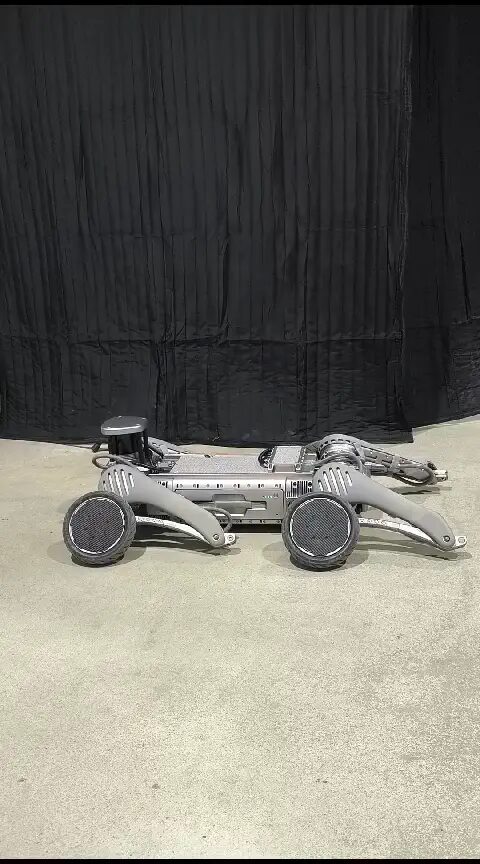
B2: standard model, 12 DOF, normal feet. B2-W: wheeled variant — specialized wheeled feet for speed on flat/paved terrain, same 12 DOF leg layout, no jump spec.
| Model | B2 | B2-W |
|---|---|---|
| Dimensions, stand (H×W×D) | 1098×450×645 mm | 1098×550×758 mm |
| Dimensions, folded | 880×460×330 mm | 950×550×450 mm |
| Weight (with battery) | ~60 kg | ~85 kg |
| Degrees of freedom | 12 (3 per leg) | 12 (3 per leg) |
| Max. knee joint torque | 360 N·m | 360 N·m |
| Max. standing load | ~40 kg | ~40 kg |
| Continuous walking load | ~120 kg | ~120 kg |
| Joint range — hip / thigh / calf | -0.87 ~ 0.87 rad · -0.94 ~ 4.69 rad · -2.82 ~ -0.43 rad | |
| Max. speed | >6 m/s | 50 rad/s (wheel velocity) |
| Max. jumping distance | >1.6 m | — |
| Climbing angle / max. step | >45° / 20–25 cm | >45° / 20–25 cm |
| Battery / IP rating | 13S Li-ion, 45Ah/2268Wh, IP67 | 13S Li-ion, 45Ah/2268Wh, IP67 |
Compute: Intel Core i5 (platform functions) + Intel Core i7 (user development) baseline, with up to 3× NVIDIA Jetson Orin NX (Arm Cortex-A78AE, 8-core, 16GB, 1024-core Ampere GPU, 2TB storage) optional for AI workloads. The Operation and Control Computing Unit is reserved for Unitree's own motion-control program — user code belongs on the Development Computing Unit only. Sensing: RS-Helios 5515 3D LiDAR (360° horizontal, 59° vertical FOV) + 2× Intel RealSense D435i depth cameras (front/rear) + optical cameras. Note: the site's own battery-life figures don't agree between tables — one spec table says ~3h20m, another says "About 4~6h" for the same battery; treat it as a range pending manufacturer clarification rather than a single number.
From unpacking to driving the B2
Ubuntu 22.04 + ROS 2 Humble on a host PC or the robot's own onboard computer — the QRE B2 services should already be installed and auto-starting on delivery.
Unpack & install the battery
Lift the robot from the case, place it on a stable flat surface with all four knees making firm ground contact. Insert the battery until it clicks (power switch facing the robot's back) — never force it.
Power on
Short-press the battery power button once, then press & hold for 3 seconds. The B2-W auto-stands after ~1–2 minutes; standard B2 stands via the remote. It boots into AI Motion Control mode by default. Emergency stop: L1 + A — damping mode, robot settles to the ground.
Connect over Ethernet
Set a static IP on your PC (192.168.123.51 / 24), then SSH to the onboard Nvidia Orin NX:
ping 192.168.123.164
ssh -X unitree@192.168.123.164
# password: Unitree0408
Check services & drive
Services auto-start on boot (~1–2 min). Verify, then teleoperate from the keyboard:
systemctl status b2-hardware
ros2 run teleop_twist_keyboard teleop_twist_keyboard \
  cmd_vel:=/b2_unit_001/hardware/cmd_vel
Full network reference table, netplan config for the camera-streaming secondary IP, workspace build steps and troubleshooting: MYBOTSHOP B2 User Manual (PDF) · also see the Remote Control section below for the full physical-controller key map.
The QRE B2 ROS 2 package set
ROS 2 packages layered on the B2 by MYBOTSHOP/QUADRUPED Robotics on top of Unitree's own SDK — hardware interface, description, control, navigation, webserver and simulation. ROS_DOMAIN_ID 10, CycloneDDS, all managed as robot_upstart systemd services. B2 supports both ROS 2 Humble (current) and Foxy (end-of-life since June 2023, deprecated) — Humble commands are shown below.
b2_platform (Hardware)
ROS 2 integration with Unitree SDK 2.0 — hardware interface, leg odometry, front/rear video streaming. Mode & gait control via the custom B2Modes.srv service: stand_up, stand_down, damp, recovery, gait_trot, gait_flatwalk, speed and body-height presets.
b2_description
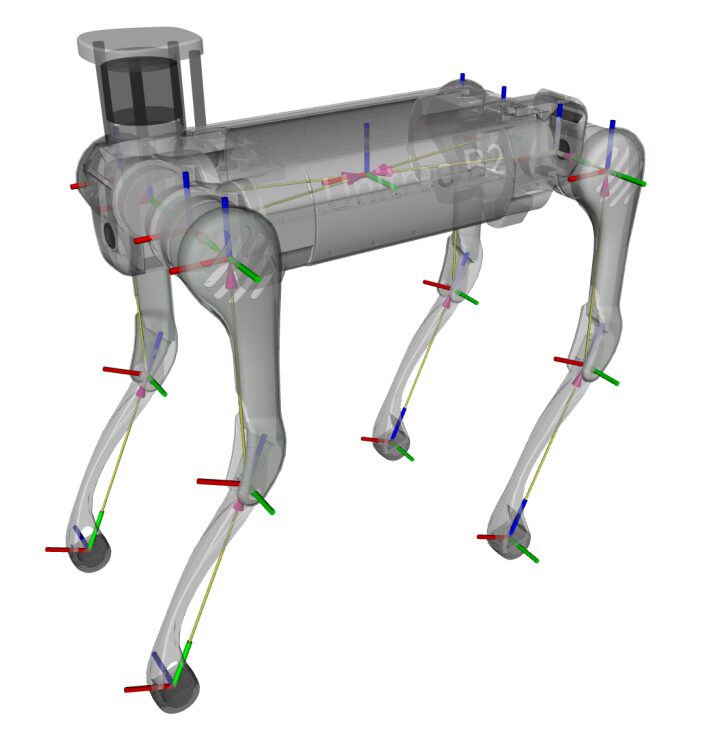
Xacro-based URDF for both variants — the model in the viewer above. Toggle with environment variables: B2_DESC for standard B2, or launch b2w_description.launch.py for the wheeled variant; B2_Z1=1 mounts the Unitree Z1 arm in the description.
b2_webserver
Pre-installed dashboard at https://<robot-ip>:9000 (admin / mybotshop). Service status, battery, GPS waypoints, rosbag recording, Dynamixel pan-tilt sliders, web joystick, front/rear camera streams, VNC desktop (port 6080) and a ROS bridge WebSocket (port 9090).
b2_control
Twist-mux arbitration across e-stop, Steam Deck, Logitech pad, webserver joystick, interactive markers and autonomous sources (9 priority tiers), plus EKF localization. ros2 launch b2_steamdeck system.launch.py drives the robot wirelessly with audio feedback.
b2_nav2
SLAM mapping (slam_toolbox + Ceres solver), odometry-only navigation with no map, full AMCL+Nav2 stack on a saved map, and GPS-based outdoor navigation — four dedicated launch files for each mode.
b2_gazebo
Gazebo Fortress simulation with gz_ros2_control, covering both the legged B2 and wheeled B2-W. Same topic/service surface as real hardware, so teleop and Nav2 code ports over unchanged.
b2_lidars & b2_depth_camera
Dual Livox Mid360 LiDAR (front 192.168.123.120, rear .121) publishing PointCloud2 + IMU per side, and Intel RealSense D435i / D405 depth cameras — both off by default and launched on demand.
b2_z1 (Arm Driver)
ROS 2 driver for the Unitree Z1 6-DOF arm mount, actively in development. Enable/disable via std_srvs/Trigger, send JointTrajectory goals across 6 joints + gripper. See the B2-W OTT build below.
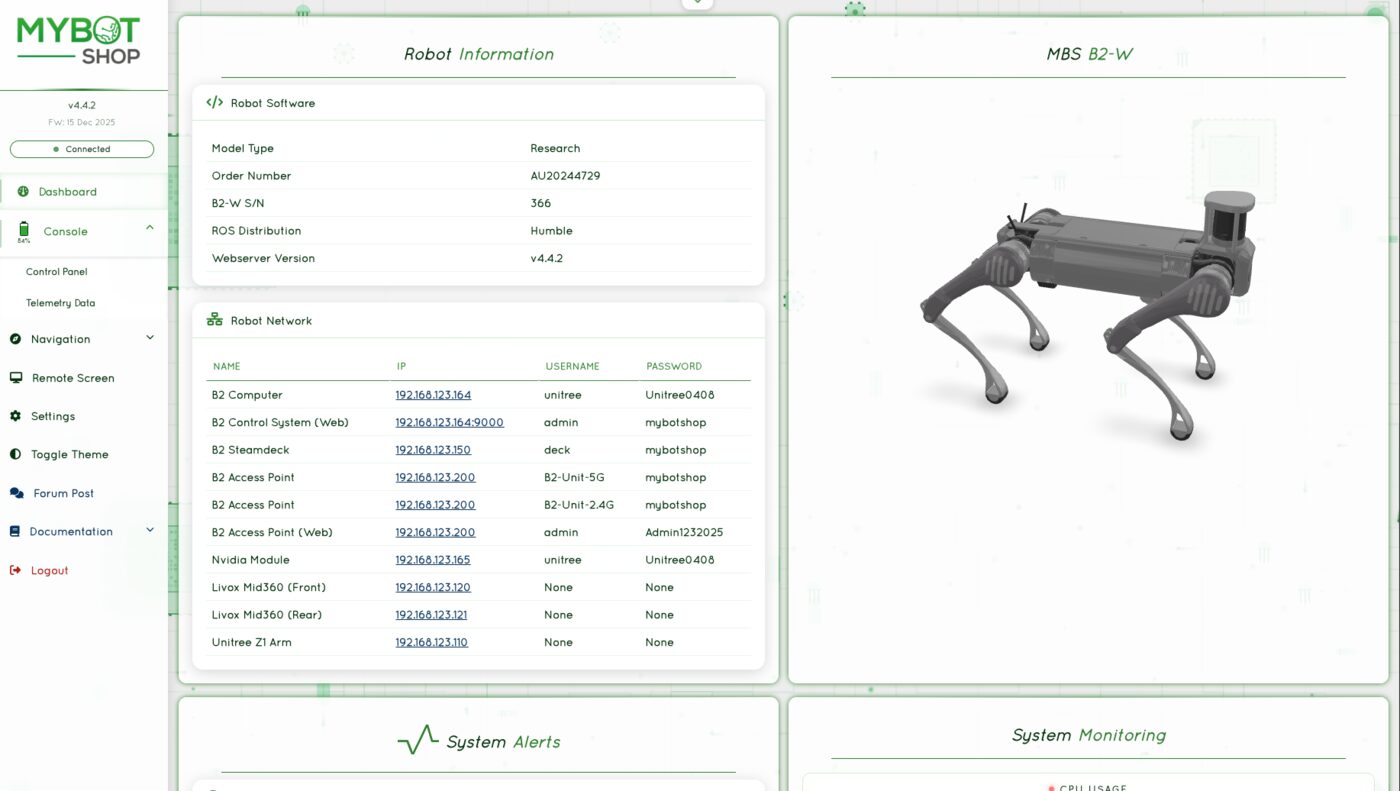
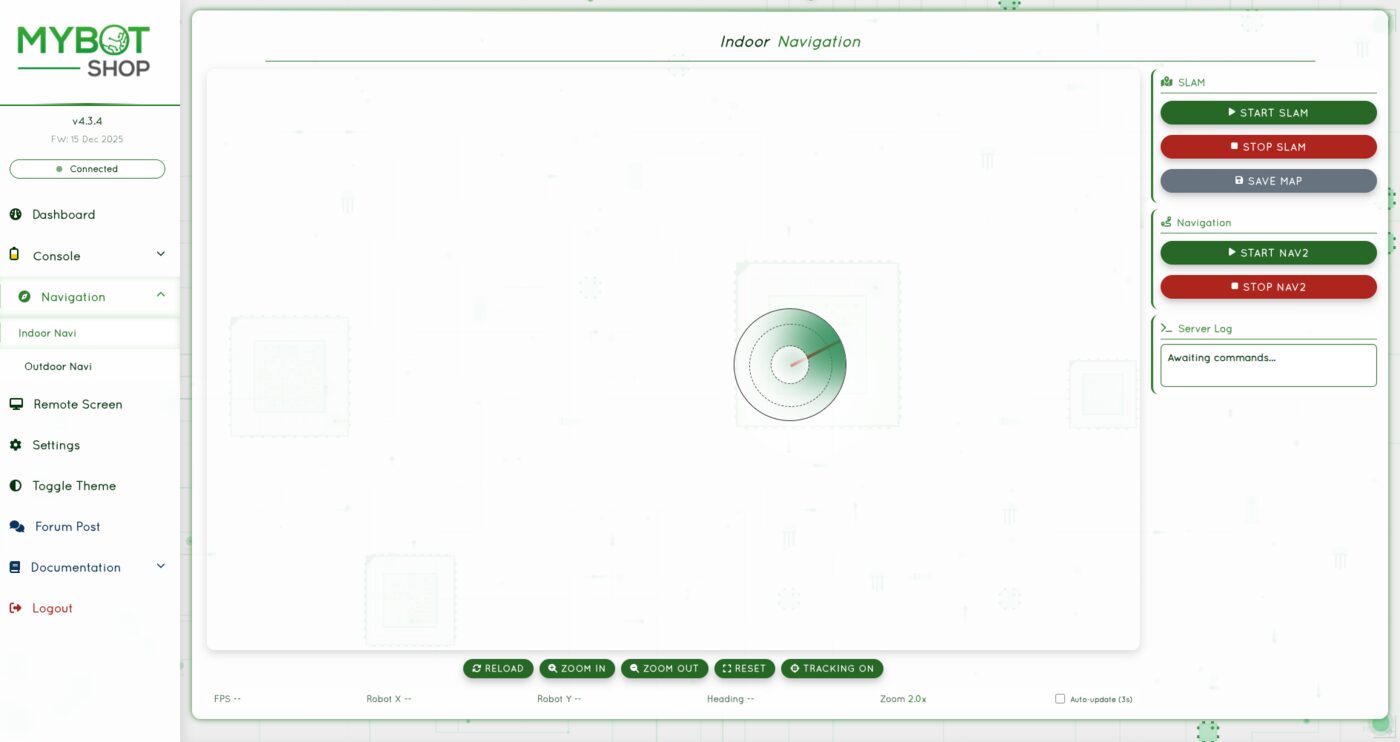
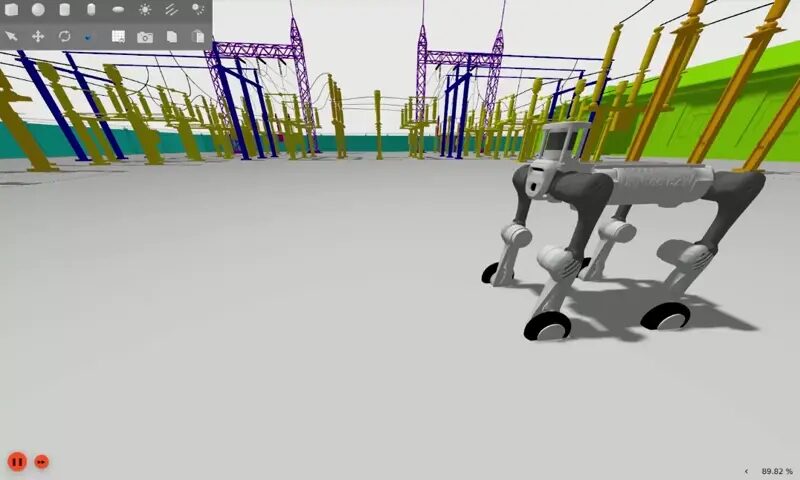
Low-level (joint-torque) control runs directly via Unitree's own SDK examples alongside the QRE B2 driver. Full package table (all 15+ mybotshop + third_party packages), config file references, debugging commands and the Humble/Foxy command differences: PDF manual.
Application builds on the B2 platform
Two dedicated demonstrator builds documented alongside the base B2/B2-W platform — a mobile-manipulation rig and an autonomous-cleaning demo.
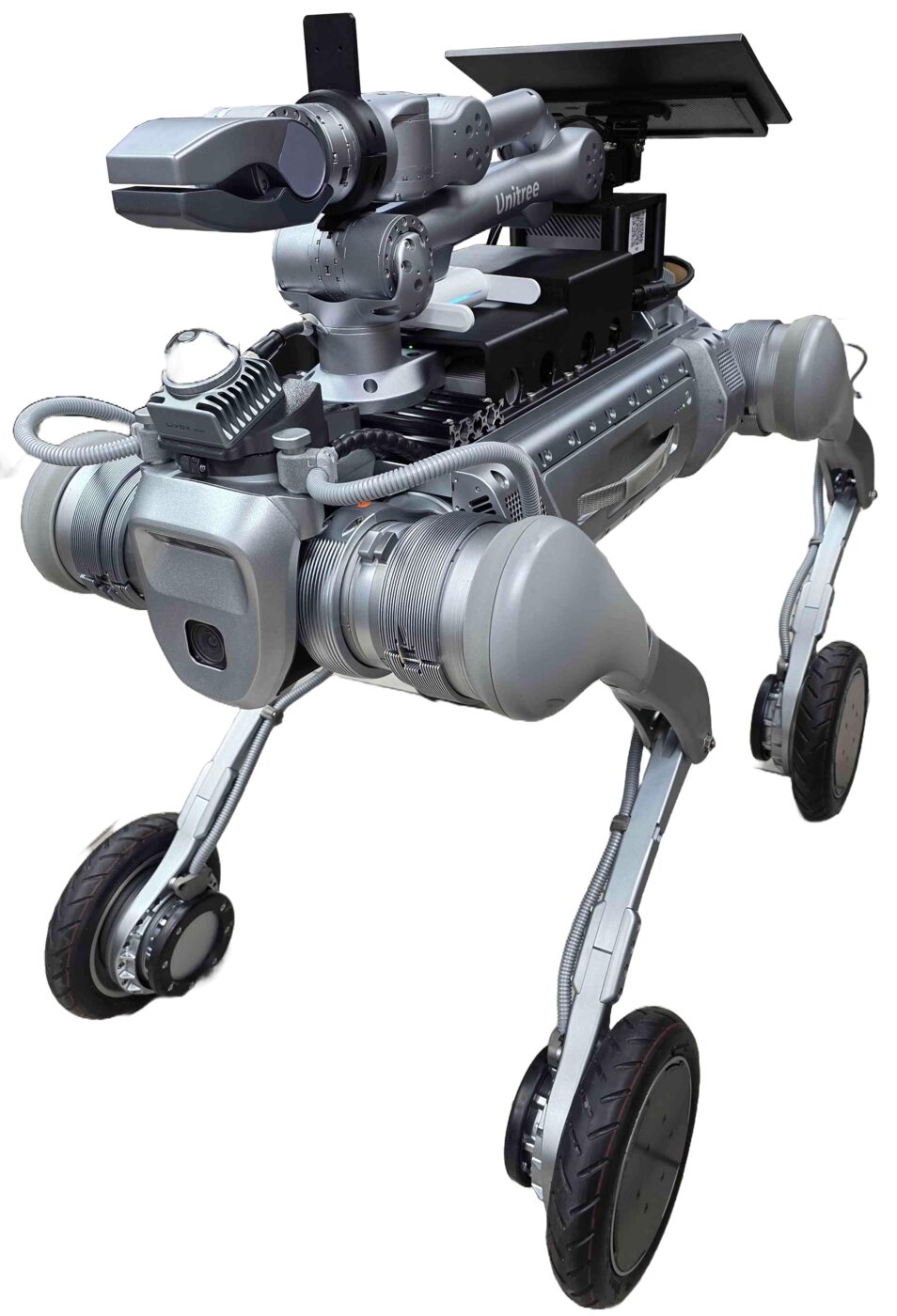
B2-W OTT — Mobile Manipulator
The B2-W wheeled quadruped (50 rad/s wheel velocity) plus a Unitree Z1 6-DOF arm with gripper, dual Livox Mid360 LiDAR, an Intel RealSense D435i and a Dynamixel pan-tilt camera — a full mobile-manipulation research platform. Same b2-hardware/b2-webserver services, plus z1/enable, z1/joint_trajectory and z1/disable for arm control.
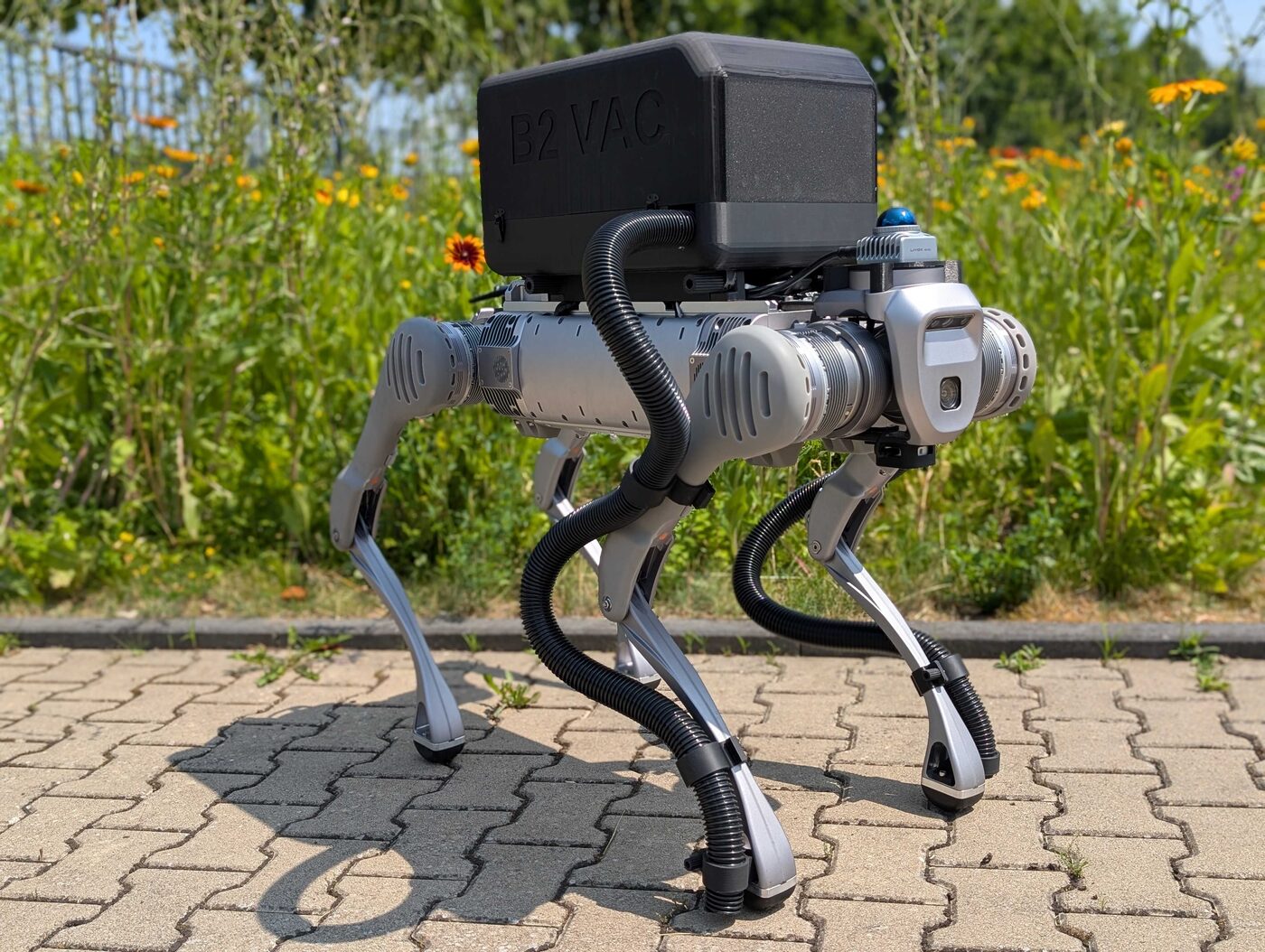
B2 Vacc — Autonomous Vacuum Demo
Standard legged B2 + Robosense LiDAR + Intel RealSense D435i + a vision-based mission-detection stack (b2_vision_action, RoboFlow-trained). At startup only the webserver is active — clicking "Reactivate Services" transitions the robot from AI Mode to Sports Mode, so keep clear once you do.
Both builds share the base B2/B2-W network map and ROS_DOMAIN_ID 10. Full setup — installation steps, camera GStreamer pipelines, mission-detection training workflow: PDF manual.
The physical controller
Bluetooth + digital-transmission remote, bound to the robot via the Unitree Explore app. Two operational modes: Regular Motion Control (manual, predictable) and AI Motion Control (autonomous terrain adaptation — the default on boot).
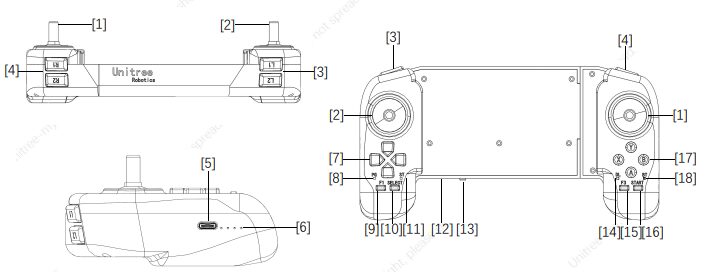
| Button | Function |
|---|---|
| START | Unlock/lock walk mode · double-click for continuous walking |
| L2 (hold) + A | Switch between standing-lock and lying-down posture |
| L2 (hold) + B | Damping mode — soft emergency stop |
| L2 (hold) + X | Fall-recovery stand-up |
| L2 double-click / L1 double-click | Low-speed mode / high-speed mode |
| RIGHT (hold) + START | Stair-climbing mode (ascend/descend) |
| L1 (hold) + up/down arrow | Adjust leg-lift height (5–35 cm) |
| Up/down arrow | Adjust body height (45–60 cm) |
| L1+L2+R1+R2 (hold) + X | Select Regular Motion Control |
| L1+L2+R1+R2 (hold) + B | Select AI Motion Control |
If the B2 enters an unexpected state: L1 + A — damping mode, it settles to the ground under control. Full button map for both modes plus B2-W-specific bindings (front-leg stand, rotating jump), rocker calibration, and remote charging/binding procedures: PDF manual.
Manuals, ROS docs & robot description
Everything published for the B2/B2-W so far — the manufacturer's own SDK docs, the MYBOTSHOP manual, and the robot description package.
Complete Source Repo
The complete ROS 2 source workspace for QRE B2 — every ROS 2 package, launch file and driver node, built and maintained by MYBOTSHOP. Confidential — shared under NDA with named customers; sign in or request access below.
Unitree Documentation & B2 SDK
The manufacturer's own documentation portal and the Unitree B2 SDK repository, for low-level control examples and hardware reference beyond what QRE B2 wraps.
Unitree support portal → unitreerobotics on GitHub →MYBOTSHOP B2 User Manual
A single self-contained manual: unpacking & power-on, network & SSH setup, the full QRE B2 ROS 2 package reference (Humble & Foxy), the B2-W OTT and B2 Vacc builds, and the complete remote-control key map.
Download PDFB2 Robot Description (URDF)
The b2_description package for the standard legged B2 — Xacro, URDF, Collada visual meshes and package.xml, the same geometry rendered live in the viewer above. This covers the standard-B2 variant only; the B2-W wheeled meshes, Z1 arm and accessory kit meshes live in the private qre_b2 repo and weren't included here to keep the download reasonable — ask us if you need those. Note: this package's package.xml declares a Proprietary license; check with support@quadruped.de before redistributing it further.
Looking for the B2-W or Z1-arm mesh sets, or GitHub access to the qre_b2 driver repository? Email us with your GitHub username and purchase ID.
If something goes wrong
Two steps, in order — the forum first for fast community and staff triage, then a direct ticket if it needs to go further.
MYBOTSHOP Forum
Open a topic on the MYBOTSHOP Forum for community and staff triage — most software questions and known issues get resolved here first. For code-level bugs, GitHub Issues, StackOverflow and Answers-ROS are also in play.
Direct ticket & RMA
If it's unresolved, email support@quadruped.de with the problem description and what's already been tried. For hardware issues we'll issue an RMA number and return instructions — returns without an RMA number are auto-rejected.
RMA returns ship to: QUADRUPED Robotics GmbH c/o MYBOTSHOP GmbH, Willy-Messerschmitt-Strasse 12, 50126 Bergheim, Germany.
We're here for the whole deployment
Fleet rollout, a B2-W or Vacc build, or a question about a specific ROS package — the MYBOTSHOP team can help.
support@quadruped.de